All Ad Settings Explained
Every Pilotbot ad setting — Auto Mode, Target Position, Overtake Step, Max Deviation, and limit & competitor filters — what each does and how to configure it.
Pilotbot Team
Author
On this page
- Tab 1. Positioning: The Mathematics of Dominating the Order Book
- Auto Mode
- Target Position
- Overtake Step
- Max Deviation
- Tab 2. Limit Filter: Cutting Out Market Noise
- Min & Max Limits
- Limit Delta Threshold
- Tab 3. Competitor Filter: Whitelists and Blacklists
- Merchants Only
- Ignore Competitors
- Combat Presets: Three Configuration Strategies for Different Goals
- Step-by-Step Launch Guide
- Related Articles
Ad Control Center: Complete Guide to Fine Settings

In arbitrage and P2P trading, every fraction of a percent of spread and every second of market reaction determine your net profit. The ad settings panel in Pilotbot is your on-board computer, where you define exact rules of engagement: from surgically overtaking direct competitors to strictly filtering out dumping bots and protecting your deposit.
Access to the panel takes just one click: find the ad in the list and click the gear icon next to the main control switches.
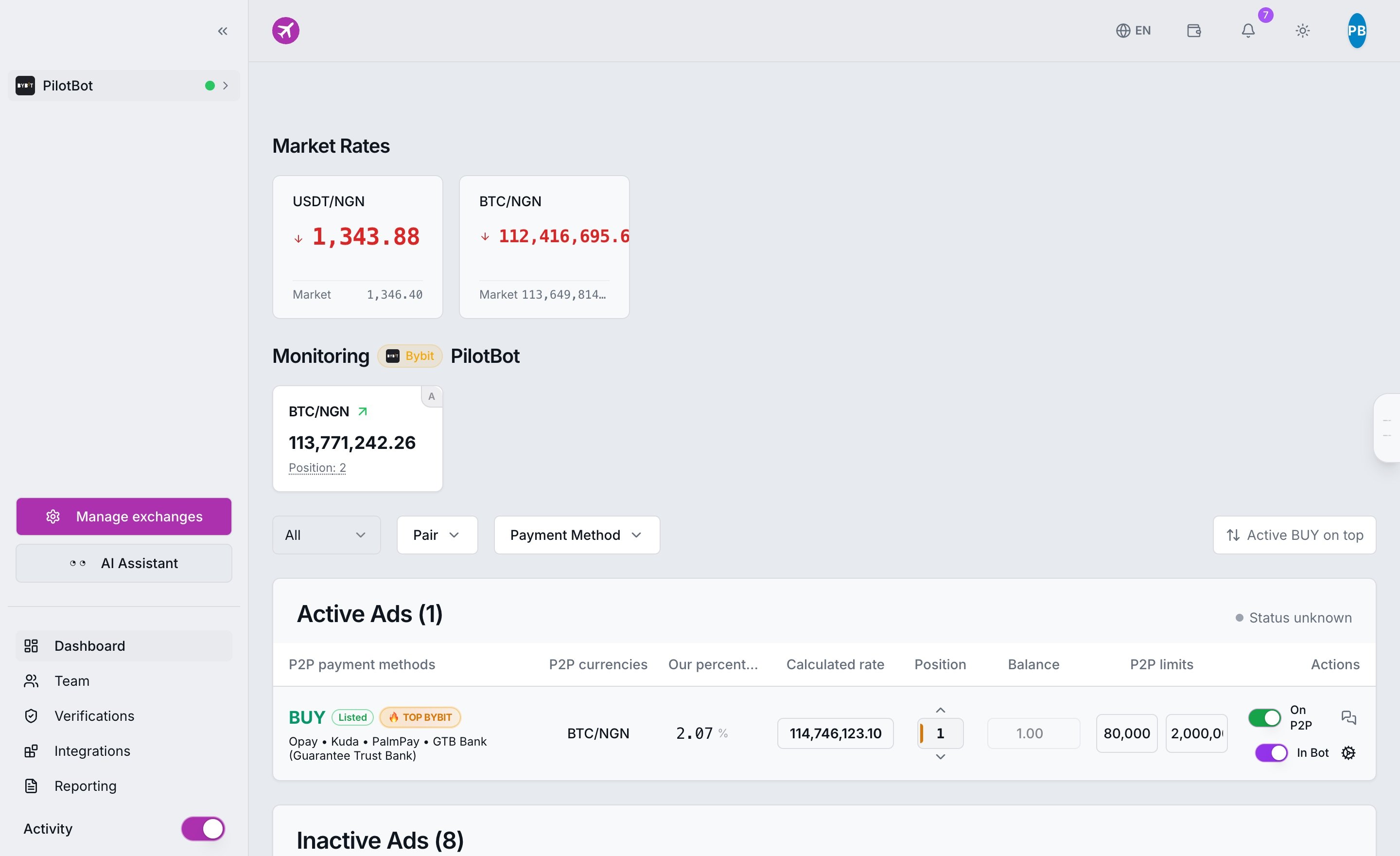
The settings interface is structured into three key sections: Positioning, Limit Filter, and Competitor Filter. Below is a detailed breakdown of each control lever, hidden calculation mechanics, and practical tips for maximizing margin.
Tab 1. Positioning: The Mathematics of Dominating the Order Book
This tab governs price positioning — exactly where in the order book your ad should be placed and with what precision each quote is calculated.
Auto Mode
The master toggle at the top of the panel.
- Enabled (ON): Full combat autopilot. Pilotbot's high-speed price worker continuously monitors exchange quotes, evaluates competitors, and automatically updates the ad price based on your formulas and rules.
- Disabled (OFF): Manual standby mode. The bot maintains a fixed, static price set by you manually and ignores all surrounding market movements.
Target Position
The desired rank of the ad in the order book (an integer from 1 to 100, default is 1).
- A value of
1means competing for the absolute top of the order book (first row). - A value of
2or3places you immediately behind the leaders, capturing a steady flow of orders without overpaying for first place. - A value of
0switches the ad to a passive spread-holding mode without being bound to a specific row.
Crucial detail: Pilotbot calculates the position not against the raw exchange list, but against a filtered order book of real competitors. Only ads matching your payment method, currency pair, and limit ranges are taken into account. Read more about ranking mechanics in Target Position and Overtake Step.
Overtake Step
The distance ahead of the competitor directly in front of you.
- This parameter defines how many fiat currency units your price will improve over the opponent's price to guarantee occupying the target rank.
- The overtake step must be a multiple of the market's minimum price tick (for example,
0.01for most fiat currency pairs). - Small step (0.01): Conserves your spread as much as possible, preserving profit margin on every order.
- Larger step (0.05–0.10): Creates a psychologically attractive gap for exchange buyers, accelerating the turnover of your liquidity.
Max Deviation
Your personal trading risk limit, specified as a percentage.
- Defines the allowable range of price movement away from the baseline market reference during aggressive competitor dumping.
- Serves as your custom "soft corridor", protecting your ad from unwanted devaluation.
- On top of your limit, Pilotbot's global Safety Corridor (±19.9%) is always active, making financial anomalies and technical errors impossible by design.
Tab 2. Limit Filter: Cutting Out Market Noise
The P2P order book is filled with "dust" micro-orders of 500 rubles and heavy institutional orders worth millions. A professional trader never competes with orders from different weight classes.
Min & Max Limits
A strict trade volume filter that eliminates irrelevant orders.
- If your working order is sized for amounts from 10,000 to 100,000 ₽, you do not need to dump against a seller with a limit up to 2,000 ₽ — you have fundamentally different buyer audiences.
- By specifying a range in the filter, you instruct Pilotbot to rank you exclusively among ads whose limits intersect with yours.
Limit Delta Threshold
Intelligent protection against cloned ads and bot networks.
- Often, the same merchant posts 3–5 ads with identical rates and limit differences of just a few dozen rubles, artificially clogging the order book.
- This filter merges such duplicates, forcing the positioning algorithm to focus only on genuinely unique market participants.
Tab 3. Competitor Filter: Whitelists and Blacklists
Here you configure targeted filters based on competitor status and reputation.
Merchants Only
Enabling this checkbox instructs Pilotbot to consider only official, verified exchange merchants in calculations.
- Regular users often place one-off ads with off-market rates to quickly offload leftover coins.
- If your target client is a repeat buyer who prefers trusted partners with a merchant badge, there is no reason to engage in price wars with casual sellers.
- Enabling this filter guarantees that positions are calculated strictly among professional participants.
Ignore Competitors
A blacklist of specific trader nicknames that the system must completely exclude from the order book during calculations.
- If an aggressive market manipulator bot or bad-faith trader with hanging fake orders appears on your trading pair, simply add their exchange nickname to this list.
- Pilotbot will calculate your rank as if that user's ads do not exist in the order book.
Combat Presets: Three Configuration Strategies for Different Goals
To get started quickly, use proven configuration templates for classic trading scenarios:
| Parameter | Aggressive Leader (Fast Turnover) | Balanced Market Maker (Equilibrium) | Large Capital (Wholesale) |
|---|---|---|---|
| Target Position | 1 (Fight for first place) | 2 or 3 (Sweet spot) | 3–5 (Deep order book) |
| Overtake Step | Minimum tick (0.01) | Minimum tick (0.01) | 0.02–0.05 |
| Max Deviation | 2.5%–3.0% | 1.5%–2.0% | 1.0% (Strict control) |
| Limit Filter | Sized to active trade volume | Sized to average check | From 50,000 / 100,000+ |
| Merchants Only | Enabled | Enabled | Depending on exchange conditions |
| Ignored Competitors | Continuous dumping monitoring | Filtering out manipulator bots | Filtering out illiquid ads |
Step-by-Step Launch Guide
- Open the settings panel via the gear icon in your ad's row on the dashboard page.
- Review the Positioning tab: select the target rank, overtake step, and allowable deviation.
- In the Limit Filter tab, specify a comfortable range of amounts to eliminate irrelevant noise.
- In the Competitor Filter tab, enable merchants-only filtering if necessary and add unwanted nicknames.
- Ensure the Auto Mode toggle is switched to "ON", and save changes.
- In the main interface, switch the global In Bot toggle to the active position.
From this moment on, your ad is under continuous control by Pilotbot's high-speed core. The system will maintain the best position 24/7, saving your time and protecting your trading capital.