Plans and Limits
Pilotbot subscription tiers — Light, Star, Pro, Elite, and Ultra — and what each includes: accounts, active ads, team seats, AI agents, and price refresh frequency.
Pilotbot Team
Author
On this page
- Plans and Features Matrix
- Limit Anatomy: The Infrastructure Behind Technical Metrics
- Exchange Accounts and Connection Isolation
- Active Ads in the Order Book
- Team Access and Operator Security
- AI Agents vs. AI Chat: A Fundamental Distinction
- Refresh Frequency: Why Seconds Matter
- Choosing Your Plan: Growth Scenarios
- Light: Streamlined Start for Solo Traders
- Star: The Daily Driver for Active Merchants
- Pro: The Industry Standard for Professional P2P
- Elite: High Frequency for Scaling Teams
- Ultra: Institutional Trading Hub
- Managing Your Subscription in the Dashboard
- Related Articles

In high-frequency P2P trading, profitability is decided by fractions of a second, mathematical pricing precision, and infrastructure resilience. Pilotbot is built as a complete P2P Trading Operating System (P2P Trading OS), where each subscription tier delivers dedicated server resources and compute bandwidth — from order book polling frequencies to parallel thread pipelines for autonomous AI agents.
Pilotbot's tier lineup scales seamlessly alongside your business: from an independent trader managing a couple of ads on a single exchange to institutional arbitrage desks coordinating dozens of merchant accounts, distributed operator shifts, and large-scale daily turnover.
Plans and Features Matrix
Each subscription tier expands key operational limits across the platform. Below is a comprehensive side-by-side comparison of all available plans.
| Parameter | Light | Star | Pro | Elite | Ultra |
|---|---|---|---|---|---|
| Supported Exchanges | 1 | 3 | 10 | 15 | 30 |
| Exchange Accounts | 1 | 3 | 10 | 15 | 30 |
| Active Ads | 2 | 30 | 100 | 150 | 500 |
| Team Seats | 0 | 1 | 6 | 12 | 24 |
| Autonomous AI Agents | 0 | 0 | 2 | 5 | 10 |
| AI Chat Assistant | Basic | Full | Full | Full | Full |
| Telegram Notifications | — | ✓ | ✓ | ✓ | ✓ |
| Price Refresh Interval | Every 15 s | Every 10 s | Every 10 s | Every 5 s | Every 5 s |
| Zero Financial Loss Protection | ✓ | ✓ | ✓ | ✓ | ✓ |
Limit Anatomy: The Infrastructure Behind Technical Metrics
Understanding how platform limits work technically helps you design the optimal operational setup without overpaying for unused capacity.
Exchange Accounts and Connection Isolation
The account limit governs how many merchant accounts on Binance and Bybit can connect to Pilotbot simultaneously.
Every connection operates within an isolated execution boundary:
- Dedicated Residential Proxy Pools: Exchange requests route through clean residential proxies with persistent IP affinity, preventing exchange fraud detection triggers associated with sudden geolocation hops.
- Independent API Sessions: An API error or temporary hold on one merchant account never impacts other active accounts.
- Multi-Exchange Arbitrage: Distribute ads across Binance and Bybit, balancing liquidity within a unified command center.
Active Ads in the Order Book
This metric defines the maximum number of ads (BUY and SELL) that Pilotbot's pricing engine simultaneously calculates and updates in real time.
If you have created 50 ad presets but your plan allows 30 active ads, the bot actively reprices the 30 toggled on. This grants operational flexibility: keep standby ads paused, activating them only during peak market liquidity or when favorable spread spreads emerge.
Team Access and Operator Security
Scaling P2P volume requires round-the-clock shift coverage. Team Seats allow you to invite operators with granular Role-Based Access Control (RBAC):
- Operators only see their assigned merchant accounts and active orders.
- Master API credentials, withdrawal keys, and financial billing settings remain completely hidden.
- The platform maintains an immutable audit log tracking every action: who adjusted an ad's status, confirmed payment receipt, or responded in trade chat.
AI Agents vs. AI Chat: A Fundamental Distinction
It is important to differentiate between conversational AI assistance and autonomous trading agents:
- AI Chat (Copilot) is available across all tiers (basic tier on Light, unlimited on Star and above). This is your interactive strategic copilot: it helps review spreads, calculate formulas, and troubleshoot platform configuration.
- Autonomous AI Agents (available starting on Pro) are independent algorithmic workers. They continuously evaluate the order book, forecast competitor behavior, dynamically tune step increments, and pause ads during extreme volatility, safeguarding profits without manual intervention.
Refresh Frequency: Why Seconds Matter
The refresh interval determines how frequently background workers poll the order book, evaluate competitor ranking, and dispatch price updates:
- 15 Seconds (Light): Ideal for lower-volatility fiat corridors or fixed-margin pricing where top-rank competition is less aggressive.
- 10 Seconds (Star, Pro): The professional industry benchmark. Enables reliable defense of Top-1, Top-2, or Top-3 positions across liquid pairs.
- 5 Seconds (Elite, Ultra): Ultra-fast high-frequency mode. Crucial for volatile currency pairs, breaking news events, and tight fiat spreads. A 5-second cadence ensures your ad is the first to capture the spread when a rival fills, while adjusting immediately during sudden market swings.
Choosing Your Plan: Growth Scenarios
To select the ideal tier, evaluate your current working capital, merchant account count, and team workflow.
Light: Streamlined Start for Solo Traders
Designed for traders exploring automated P2P trading or validating Pilotbot on a single exchange with 1–2 key ads. Experience platform stability and algorithmic execution with minimal overhead.
Star: The Daily Driver for Active Merchants
Optimized for merchants operating 2–3 accounts with a pool of up to 30 ads. Includes instant Telegram notifications, faster 10-second updates, and 1 assistant team seat.
Pro: The Industry Standard for Professional P2P
The most popular choice among professional traders. 10 exchange accounts, up to 100 active ads, 6 team seats, and 2 autonomous AI agents. Automation handles daily operational repricing end-to-end, freeing up your time for liquidity and banking relations.
Elite: High Frequency for Scaling Teams
Engineered for expanding arbitrage groups and multi-operator desks. 5-second reaction time, 15 exchange accounts, 150 active ads, 12 team seats, and 5 autonomous AI agents. Dominate liquid order books through minimal market latency.
Ultra: Institutional Trading Hub
The flagship, no-compromise tier: up to 30 exchange accounts, up to 500 active ads, 24 team seats, and 10 autonomous AI agents with 5-second polling loops. Built for high-volume P2P offices with 24/7 shifts and large daily turnover.
Managing Your Subscription in the Dashboard
Monitoring quotas, adjusting plans, and managing payments is straightforward in your billing settings.
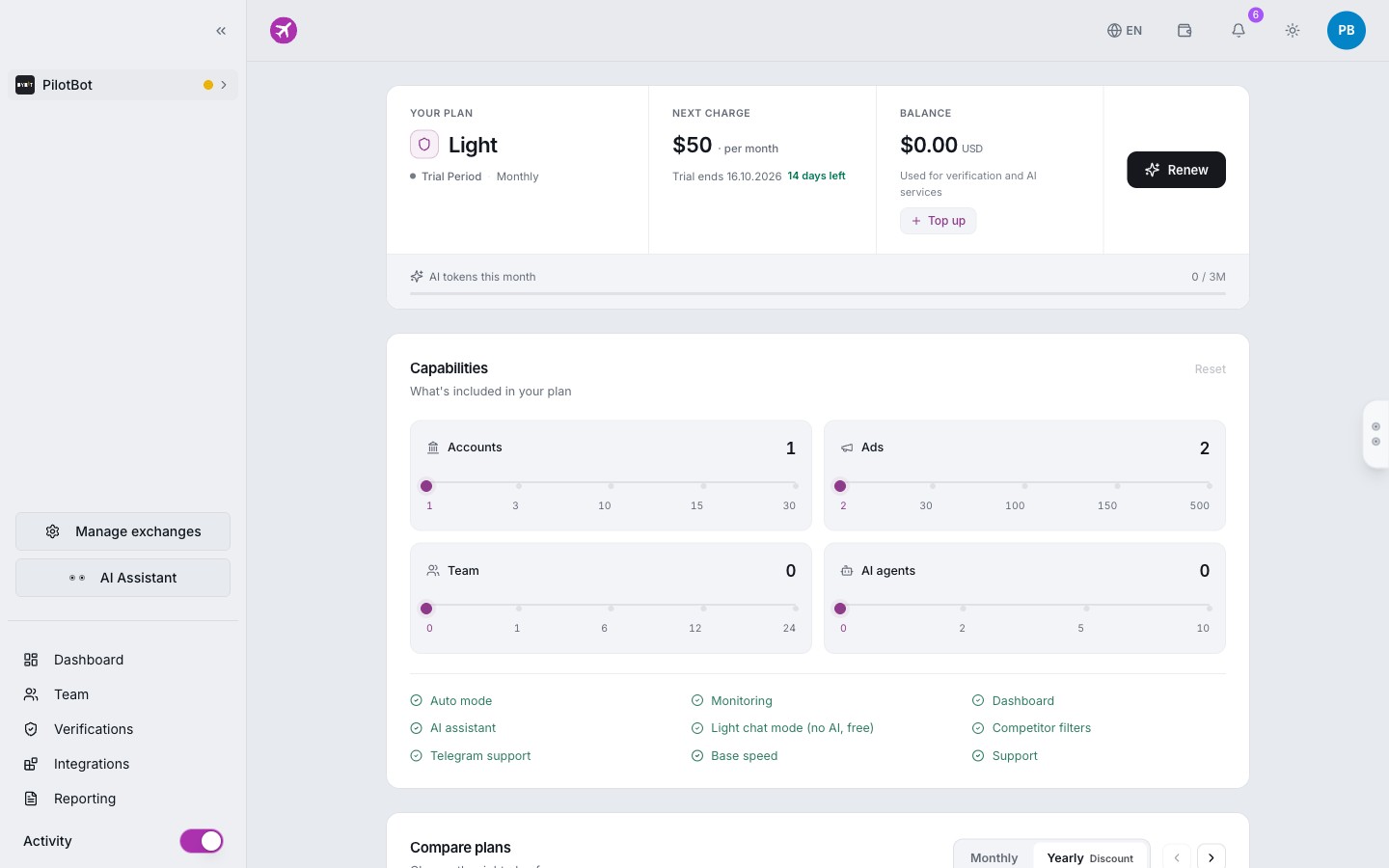
In the billing dashboard, you can always review:
- Current subscription tier and renewal date.
- Real-time limit consumption (active accounts, utilized ad slots, and invited team members).
- Billing cycle toggle (monthly or discounted annual billing).
- One-click renewals and instant plan upgrades via crypto or platform account balance.