Managing Ads: Two Switches and the Dashboard
How ads move from inactive to active in Pilotbot, what the two switches ('In Bot' and 'On P2P') do, and why only you can turn ads on.
Pilotbot Team
Author
On this page
- Dashboard Anatomy: Every Control Lever on One Screen
- Buffer Zone: Why New Ads Always Start in Inactive
- Two Switches: The Formula for Independent Control
- The "In Bot" Switch: Delegating Price to the Algorithm
- The "On P2P" Switch: Exchange Order Visibility
- 4 State Combinations: Operational Scenarios
- Defensive Architecture: Why the Bot Never Activates Orders Autonomously
- Fine Settings: The Gear Icon
- Knowledge Base: Recommended Reading

Liquidity Command Center: How the Pilotbot Dashboard and Two Switches Work
Once your exchange account is connected, you are presented not with a basic trade table, but with an advanced trading terminal. Here converges the live order book streams from Binance, Bybit, and HTX, the mathematical precision of the price worker, and your personalized risk boundaries.
The core principle of the Pilotbot ecosystem is uncompromising: only the trader decides when to deploy the algorithm. The bot will never arbitrarily publish an order or activate price management without your direct click.
Let's examine the architecture of the main dashboard and the operational logic of the two key switches that grant you absolute control over the P2P market.
Dashboard Anatomy: Every Control Lever on One Screen
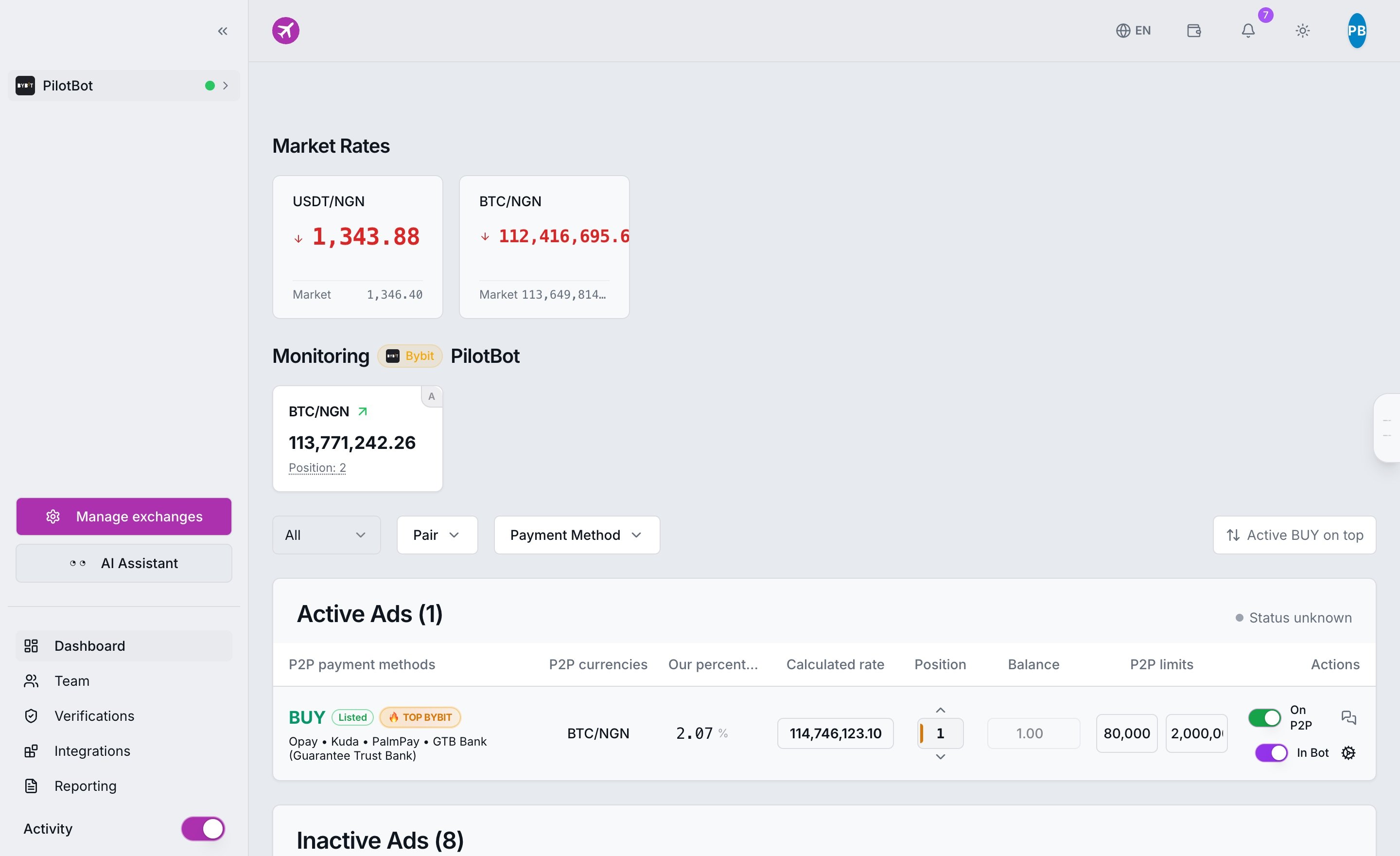
Pilotbot's workspace is engineered so you can evaluate the entire trading landscape in under 2 seconds without endless exchange tab switching:
- Exchange Rates and Benchmarks — Real-time snapshots of market rates across pairs (USDT/RUB, USDT/KZT, BTC/EUR, etc.). For details, consult our rates guide.
- Live Worker Telemetry — Real-time platform pulse: status of every ad, current spread, refresh latency, and order book depth. Details in the Worker Monitor.
- Active Ads Section — The operational zone. This contains orders actively governed by Pilotbot's pricing algorithm.
- Switch Matrix — Independent
In BotandOn P2Ptoggles on each row. - Inactive Ads Incubator — A safe harbor for offline orders and new listings awaiting fine-tuning.
Buffer Zone: Why New Ads Always Start in Inactive
Following initial API synchronization, all your existing exchange ads populate under the "Inactive Ads" section.
This is a fundamental pillar of our Zero Financial Loss security principle:
- The system never intervenes in pricing until you establish your rules of engagement.
- The ad row immediately displays vital metrics: payment methods, fiat currency, your target margin percentage, calculated rate relative to benchmark, live order book rank, and active limits.
- This is your calibration staging area: here you configure acceptable price corridors, overtake margins, and competitor filtration rules.
Two Switches: The Formula for Independent Control
Every row in the dashboard features two independent toggles. Remember the primary rule: toggling one switch on never automatically activates the other.
| Switch | Domain of Control | What Happens When Enabled |
|---|---|---|
| In Bot | Pilotbot Algorithm | The ad enters autopilot: the worker monitors the order book second-by-second and updates price |
| On P2P | Exchange Listing | Mirrors status on the exchange (Binance / Bybit / HTX): makes the order visible to counterparties |
The "In Bot" Switch: Delegating Price to the Algorithm
As soon as you switch "In Bot" to active:
- The ad immediately transitions to the upper table — "Active Ads".
- Price worker activates: the bot commences price calculation cycles, benchmarks competitors in the order book, applies your overtake step (undercutting/overbidding), and defends your target position strictly within the specified safety corridor.
The "On P2P" Switch: Exchange Order Visibility
The "On P2P" toggle provides direct control over order visibility on the cryptocurrency exchange itself:
- ON: The ad is published, active, and available for counterparties across the P2P market to initiate trades.
- OFF: The order is hidden from the exchange order book (paused); incoming trades are blocked.
4 State Combinations: Operational Scenarios
- In Bot [ON] + On P2P [ON] — Live Combat Autopilot The canonical trading mode. The order is published on the exchange, counterparties see it at the top of the book, and Pilotbot dynamically updates the quote through every market swing.
- In Bot [ON] + On P2P [OFF] — Standby / Staging Mode Warm-up strategy. The algorithm tracks the market and verifies parameters, but the ad itself remains hidden on the exchange (ideal during lunch breaks or while awaiting bank limit resets).
- In Bot [OFF] + On P2P [ON] — Manual Trading Mode The order is visible on the exchange, but the bot does not touch it. The price remains locked at whatever static figure you manually configured on the exchange.
- In Bot [OFF] + On P2P [OFF] — Complete Freeze The order is hidden on the exchange and completely disregarded by the algorithm. A safe archive and paused state.
Defensive Architecture: Why the Bot Never Activates Orders Autonomously
Pilotbot enforces strict risk isolation. Human discretion and automated execution are separated:
- Activation Is Strictly Manual: Neither a technical server reboot, nor market updates, nor API syncs can switch
In BottoONwithout your explicit click. - Automated Fail-Safe Deactivation: If an ad abruptly deactivates on the exchange (coin balance depleted, exchange order cap reached, or you closed the ad via the exchange mobile app), the worker immediately switches
In Botto OFF. - Context Preservation: A notification explaining the precise reason for deactivation appears in the dashboard, while all fine-tuned settings (target position, step, offsets) remain completely intact.
Fine Settings: The Gear Icon
Before flipping the In Bot switch, take a minute to calibrate your parameters via the gear icon next to the toggles:
- Target Position — Which rank in the order book to compete for (1st, 2nd, or deeper).
- Overtake Step (Undercut) — By what fraction of a cent or kopeck to lead the competitor.
- Safety Corridor (Min/Max) — Critical price boundaries that the worker will never breach under any circumstances, protecting you from selling at a loss.
- Competitor Filters — Exclusion of irrelevant listings with suspiciously tiny or massive limits.
For step-by-step recommendations on each setting, see our ad settings guide.