Worker Monitor — Is the System Running and What Is My Position?
How to verify that Pilotbot is actively pricing your ads, read monitoring cards, open the live order book, and understand Online, Offline, and Price Held statuses.
Pilotbot Team
Author
On this page

The Monitoring section is your mission control and the real-time heartbeat of Pilotbot. Here, you get immediate confirmation that the worker is online, algorithms are evaluating the market, and your ads are maintaining their designated target positions. You never have to manually watch the screen 24/7 — the monitor is engineered for absolute control and confidence in every price adjustment.
System Pulse: Interactive Dashboard
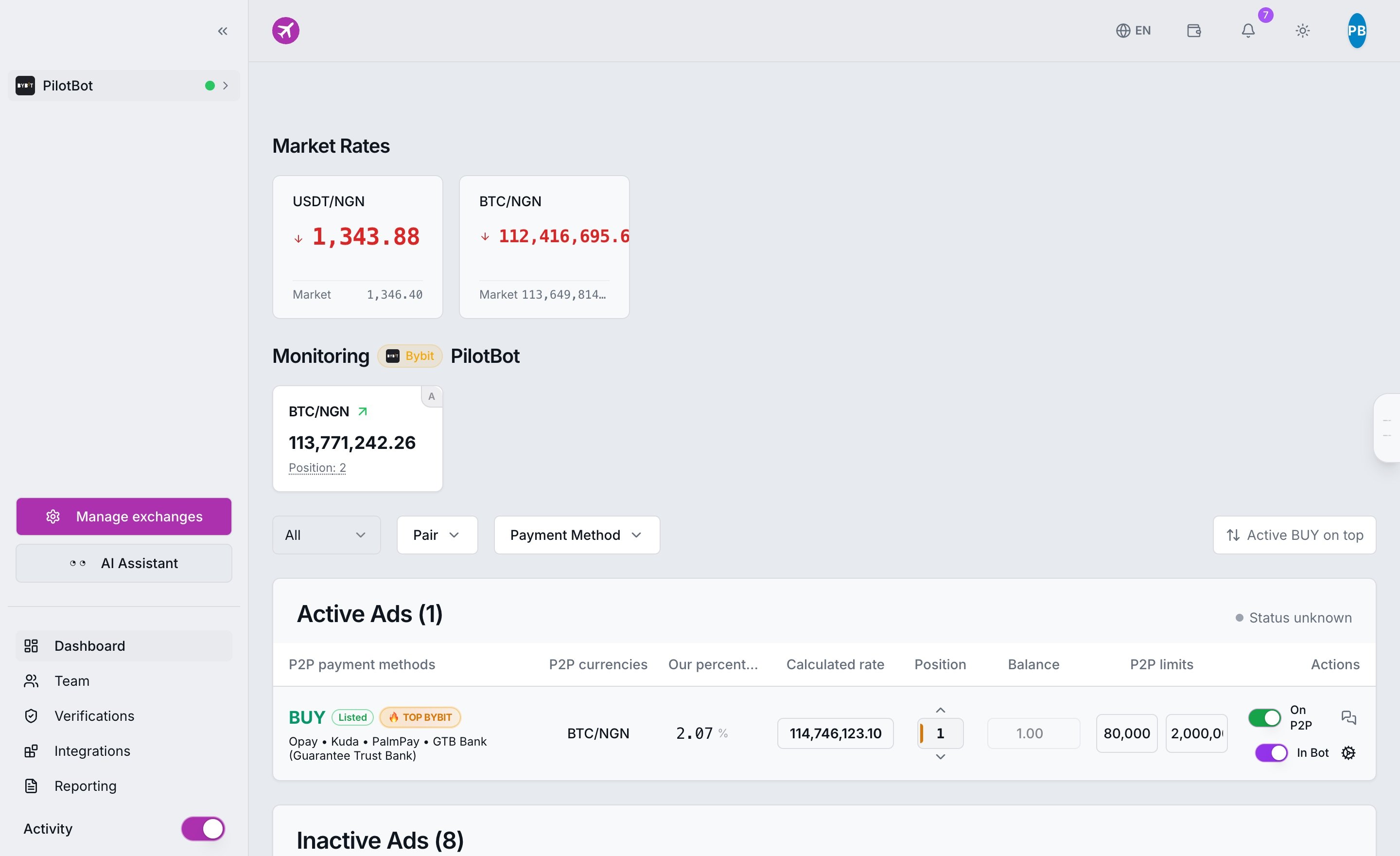
All essential metrics are gathered on a single screen. You see live market dynamics, active pairs, exchange account connection statuses, and the current refresh frequency of the worker.
Ad Cards: Complete Position Anatomy
Within the monitoring section, each active ad displays a dedicated informative card:
- Trading Pair and Mode: Currency pair (e.g., USDT/RUB), connected exchange account, and the AUTO badge confirming active automation.
- Current Price: The large, real-time price of your ad on the exchange right now.
- Current Position: The exact rank of your ad in the market order book among all active competitors.
- Sync Indicator: A visual indicator confirming live worker responses and data updates.
Live Order Book: Full Transparency for Every Decision
Each card features an "Open Order Book" button. This opens a direct window into the live market, showing the real-time queue of competing orders:
- You see competitors placed directly above and below you.
- You understand exactly why the system placed that specific price: the bot factors in your configured step increment and target position.
- The order book applies the identical filters configured in your ad (volume limits, payment methods, counterparty verification requirements). You only see relevant rivals that actively impact pricing.
Ad Statuses: How to Read System Signals
Status indicators enable you to quickly gauge the state of each ad:
- Online — Account is connected, exchange connectivity is healthy, and the worker manages ads normally.
- Offline — Connection to the exchange has been interrupted or the API key expired. The bot temporarily cannot update quotes until access is restored. Read more in Reconnecting an Account.
- Price Held — The system is active, but the price is intentionally anchored at a safe boundary. In almost all cases, this indicates that the market target has moved beyond your safety corridor. This is an intentional capital safeguard, not an error. Learn more in Why a Price Looks Frozen.
Online vs. Price Held: A Fundamental Difference
It is vital to distinguish technical issues from algorithmic risk management:
- Offline — Technical connection breakdown (exchange API outage or network gateway issue).
- Price Held — Deliberate safety protocol activation. The system is awake and evaluating the order book, but purposefully refuses to dump below profitable levels, preserving your capital threshold.
Quick Troubleshooting: What to Do in Case of Anomalies
- Account went Offline → Verify API key status and network access in the guide on Reconnecting an Account.
- System stopped completely → Follow the checklist in What to Do When the Bot Stops.
- Price is not moving, but cards update → The safety corridor has triggered. For detailed analysis, see Why a Price Looks Frozen.