Notifications — What Pilotbot Tells You
Types of alerts sent by Pilotbot — price updates, ad state changes, errors, and exchange connectivity — where they appear, and Telegram alerts on higher plans.
Pilotbot Team
Author
On this page
- System Pulse: Dashboard Notification Center
- Signal Anatomy: What Pilotbot's Radar Reports
- 1. Price Changes (Price Recalculation)
- 2. Ad State Changes (Ad State)
- 3. Exchange Gateway Status
- 4. Security & Exceptions
- 5. Platform Dispatch
- Delivery Channels: From In-App to Instant Telegram Alerts
- Early Warning System: Preventing Losses
- Operational Protocol: Responding to System Signals
- Related Guides

Successful P2P trading is built not on endlessly refreshing browser tabs, but on timely access to precise, reliable operational signals. Pilotbot's Notification Center is your personal radar and the vigilant pulse of your entire trading operation. It filters out background market noise and instantly streams only the events that directly impact your profit margins, top-rank retention, and capital safety.
With our engineered notification architecture, you always stay in control: the system continuously monitors exchange gateway health, tracks price adjustments, and proactively alerts you to conditions that require your intervention.
System Pulse: Dashboard Notification Center
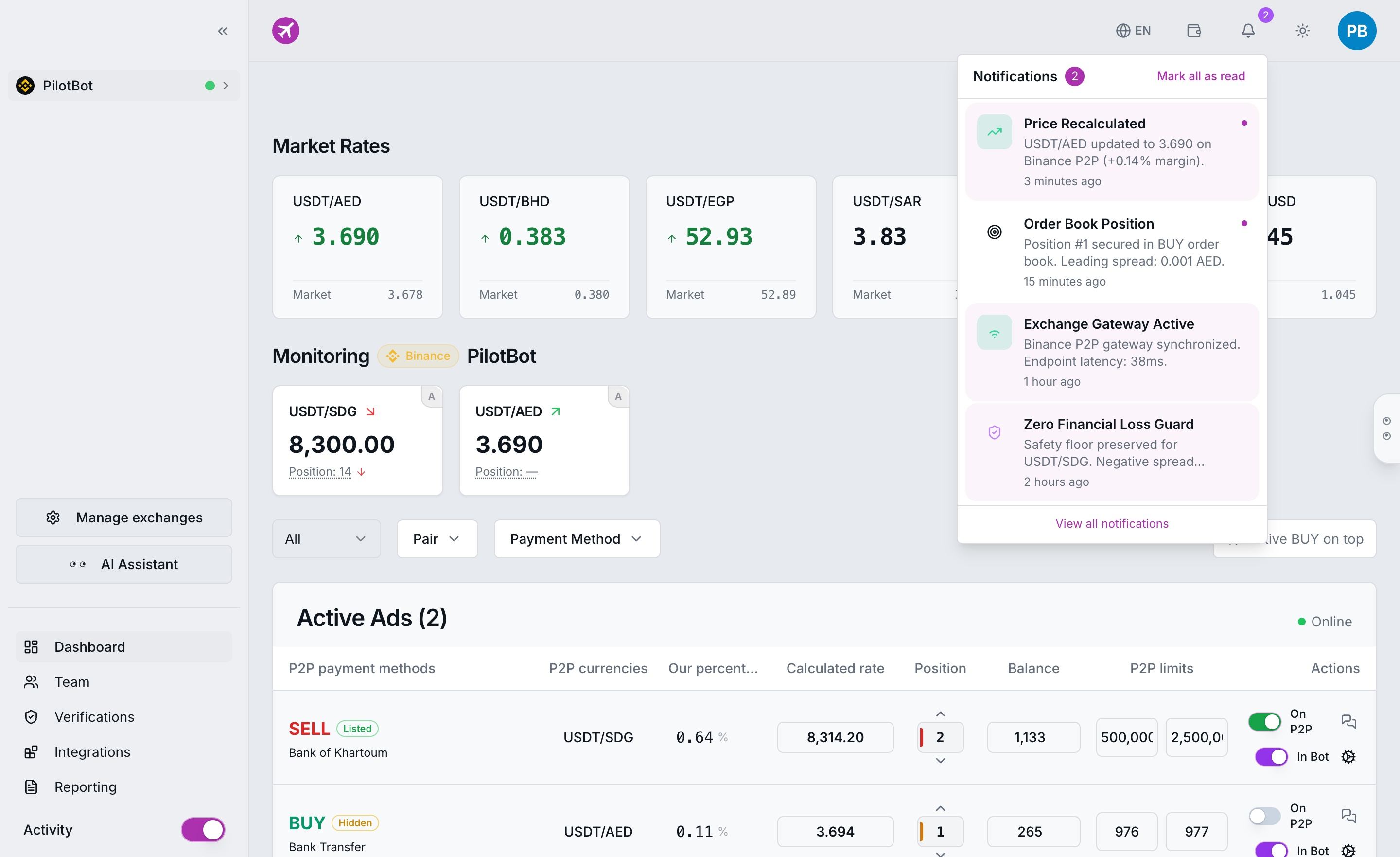
Inside Pilotbot, notifications are seamlessly woven into your central trading workspace. All critical events update in real time directly on your main dashboard:
- Interactive Bell with Counter: Located in the top navigation bar, the event indicator flags activity. Any price recalculation, status change, or system announcement increments the unread counter (e.g.,
Notifications 2) with instant one-click clearing (Mark all as read). - Order Book Rate Updates (Price Recalculated): Confirms algorithmic price adjustments with trading pair, exchange, and margin spread (e.g.,
USDT/AED updated to 3.690 on Binance P2P (+0.14% margin)). - Target Position Control (Order Book Position): Signals when your ad captures and locks its target position (e.g.,
Position #1 secured in BUY order book. Leading spread: 0.001 AED). - Exchange Gateway Health (Exchange Gateway Active): Verifies continuous live synchronization and round-trip API latency (e.g.,
Binance P2P gateway synchronized. Endpoint latency: 38ms). - Capital Safety Bounds (Zero Financial Loss Guard): Warns when the protective floor activates against competitor dumping (
Safety floor preserved for USDT/SDG), preventing underwater sales. - Instant Toast Alerts: During active terminal sessions, high-priority changes trigger temporary interactive toast alerts, so you immediately see algorithmic execution without switching tabs.
Signal Anatomy: What Pilotbot's Radar Reports
Every notification in Pilotbot follows strict categorization and priority grading across five core operational dimensions:
1. Price Changes (Price Recalculation)
Signals that the worker's pricing engine recalculated rates and successfully updated your ad on the exchange in response to order book fluctuations or competitor maneuvers. The alert records the new price, trading pair, and undercut/overcut increment.
2. Ad State Changes (Ad State)
Keeps you informed across your orders' full lifecycle:
- Ad successfully published and secured its target position in the order book.
- Ad hidden or archived by the exchange.
- Remaining inventory thresholds reached or ad temporarily deactivated due to insufficient balance.
3. Exchange Gateway Status
A vital indicator tracking communication between Pilotbot and exchange endpoints (Binance, Bybit, OKX, or HTX). You are notified instantly if a connection drops due to exchange network hiccups, and confirmed immediately when normal connectivity resumes.
4. Security & Exceptions
High-priority alerts requiring immediate attention:
- API key expiration or revoked trading permissions.
- Price update rejected by the exchange due to temporary restrictions or invalid price tick size.
- Exchange gateway rate limits encountered.
5. Platform Dispatch
Announcements from the Pilotbot engineering team regarding scheduled infrastructure maintenance, pricing engine enhancements, or newly released features.
Delivery Channels: From In-App to Instant Telegram Alerts
Pilotbot is architected so you never need to remain tethered to your desk. The platform offers multi-tier notification routing based on your subscription:
- In-App Alerts: Standard across all tiers. Complete notification history, visual counters, and real-time toast alerts.
- High-Reliability Telegram Alerts: Available on Star plans and above. Linking our official Telegram bot routes critical operational alerts directly to your phone with minimal latency.
Telegram integration transforms your mobile device into a remote command station: receive instant push alerts for disconnected accounts, position shifts, or API key errors, even when your laptop is closed and you are on the go. Compare plan capabilities in detail in Plans and Limits.
Early Warning System: Preventing Losses
The core value of Pilotbot's notification architecture is proactive defense. Alerts function as an early warning radar, mitigating financial and operational risks long before they can compound:
- Instant Offline Warning: If an exchange drops a session, the bot notifies you within seconds. Your ads will never sit exposed with stale prices in a volatile market.
- Key Health Integrity: If permissions change on the exchange, you are signaled immediately to renew your API key, avoiding interrupted order flow.
- Worker Transparency: Routine synchronization logs confirm the bot is maintaining target step increments and defending your position rank.
Operational Protocol: Responding to System Signals
When your radar flags a high-priority event, execute the following standardized steps:
- "Exchange Offline" Signal
Check exchange operational status and review gateway connectivity in How to Reconnect an Account. - "API Key Error / Invalid Permissions" Signal
Open exchange API management and verify required permissions via API Key Permissions Guide. - "Price Held / Safety Bound Triggered" Signal
Analyze competitor behavior in the order book and review Why a Price Looks Frozen. - Notification Stream Halts During Active Trading
Verify worker process health using our checklist in What to Do When the Bot Stops.