Changing Your Plan (Upgrading or Downgrading)
How to switch between Pilotbot subscription tiers, what you gain when upgrading, and what to verify before downgrading to keep your ads running smoothly.
Pilotbot Team
Author
On this page
- Upgrading Your Plan: Scale Your Trading Without Delays
- Managing Your Subscription in the Dashboard
- Simple Switching Procedure
- Downgrading Your Plan: Smooth Transition Without Disruptions
- Downgrade Readiness Checklist
- Quick Comparison: Which Tier Fits You Right Now
- Frequently Asked Questions When Switching Plans
- Does the pricing worker pause when changing plans?
- Can I return to my previous plan at any time?
- What happens to trade history and analytics?
- Related Articles

P2P trading and arbitrage operate in a fast-paced environment where working capital, active pair counts, and team sizes evolve continuously. Today you might be testing market conditions across a couple of key ads, and a month later managing a distributed operator team across dozens of accounts on Binance, Bybit, and other exchanges.
Your Pilotbot subscription is engineered to adapt and scale directly alongside your trading operation. Transitioning between plans happens instantaneously, with zero downtime and no interruption to your pricing worker.
Upgrading Your Plan: Scale Your Trading Without Delays
When your trading operation outgrows your current subscription boundaries, upgrading lifts capacity limits and unlocks advanced computational performance.
What you gain when moving to a higher tier:
- More Accounts and Exchanges. Connect additional exchange profiles (from 1 on Light up to 30 on Ultra) and distribute capital across multiple platforms.
- Order Book Scale. Increase the number of concurrent active ads — from 2 on Light up to 500 on Ultra.
- Team Collaboration. Invite operators with granular Role-Based Access Control (up to 24 seats). Your team executes trades within a unified workspace without access to master API credentials or fund withdrawals.
- Autonomous AI Agents. A true technological leap in P2P: starting from Pro (2 agents), Elite (5), and Ultra (10), routine pricing management can be delegated to autonomous AI. The agent continuously monitors competitors, protects target spreads, and defends top-rank order book positioning.
- Turbo Price Refresh Intervals. On Elite and Ultra plans, the pricing engine polls the order book every 5 seconds, capturing split-second market opportunities during volatile shifts.
Managing Your Subscription in the Dashboard
Switching plans in Pilotbot takes less than a minute. The platform handles all prorated calculations and configuration updates automatically.
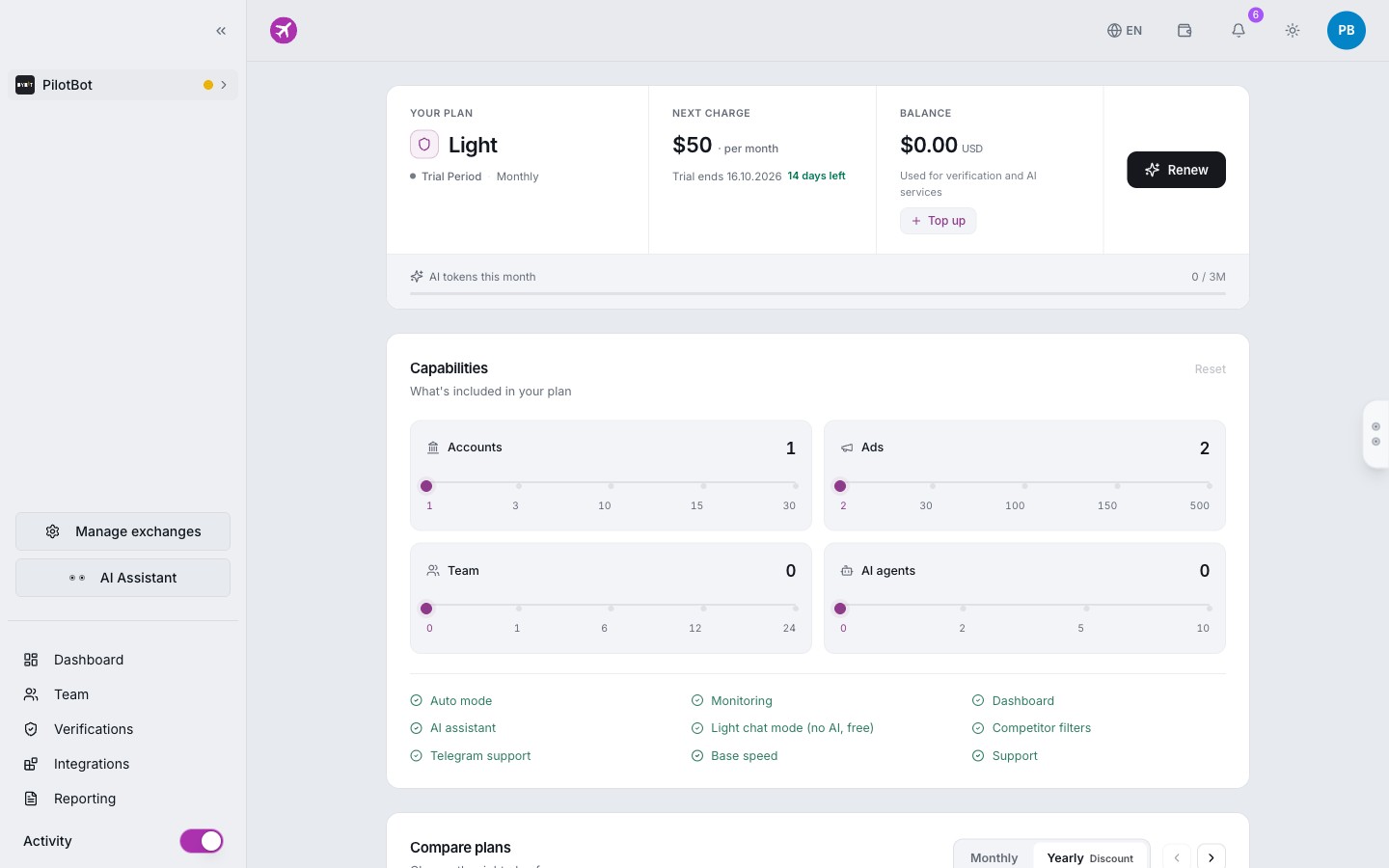
Simple Switching Procedure
- Open Settings and select the Subscription & Billing tab (or click your current plan name in the left sidebar).
- Review the plan matrix — the system highlights your active limits alongside the capabilities of higher tiers.
- Select your desired plan and click Upgrade to This Plan.
- Confirm the transaction using your preferred payment method.
Downgrading Your Plan: Smooth Transition Without Disruptions
If market activity slows or you want to optimize operational expenses, you can downgrade to a lighter plan at any time.
Because each tier enforces specific operational ceilings, it is essential to ensure your active setup fits within the lower plan limits before downgrading. This prevents ads from unexpectedly dropping out of active repricing.
Downgrade Readiness Checklist
Before confirming a downgrade, verify these four key areas:
- Active Ads. Ensure your number of active ads does not exceed the target plan limit (e.g., maximum 30 for Star or 2 for Light). Simply pause surplus ads in advance.
- Exchange Connections. Check the number of connected exchange accounts. If the new tier allows fewer accounts, disconnect unused or standby API profiles.
- Team Seats. If switching to a plan with fewer seats (or Light, which does not support team members), deactivate surplus operator accounts.
- Autonomous AI Agents. Keep in mind that autonomous AI agents operate only on Pro, Elite, and Ultra. Downgrading to Star or Light will stop AI strategies, returning price adjustments to standard algorithmic repricing.
Quick Comparison: Which Tier Fits You Right Now
To quickly determine your ideal tier, review the feature breakdown:
| Parameter | Light | Star | Pro | Elite | Ultra |
|---|---|---|---|---|---|
| Exchange Accounts | 1 | 3 | 10 | 15 | 30 |
| Active Ads | 2 | 30 | 100 | 150 | 500 |
| Team Seats | 0 | 1 | 6 | 12 | 24 |
| Autonomous AI Agents | 0 | 0 | 2 | 5 | 10 |
| AI Chat Assistant | Basic | Full | Full | Full | Full |
| Telegram Notifications | — | Included | Included | Included | Included |
| Price Refresh Interval | Every 15 s | Every 10 s | Every 10 s | Every 5 s | Every 5 s |
- Light — The streamlined entry point for solo merchants operating on a single exchange.
- Star — The standard choice for active merchants managing multiple order books with Telegram alerts.
- Pro — The professional benchmark for traders who need autonomous AI agents and team seat delegation.
- Elite & Ultra — Enterprise scale for large P2P offices, multi-trader arbitrage desks, and lowest market latency.
Frequently Asked Questions When Switching Plans
Does the pricing worker pause when changing plans?
No. Pilotbot's architecture is engineered for Zero Downtime. The worker applies new configuration profiles dynamically without dropping spread tracking in the order book.
Can I return to my previous plan at any time?
Yes, you maintain full control over your subscription. Scale up during high-volatility seasons and return to baseline tiers during quieter market periods.
What happens to trade history and analytics?
Your entire trade journal, spread history, price adjustment logs, and financial metrics remain fully preserved regardless of plan changes.