Automation Has Stopped — What to Do
A simple checklist if Pilotbot stops repricing your ads: connectivity, on/off toggle, safety corridor, and subscription limits.
Pilotbot Team
Author
On this page
- Step 1. Check the Automation Toggle in Pilotbot Dashboard
- Step 2. Check the Ad Status on the Exchange Itself
- Step 3. Connection Pulse: Worker Health and API Keys
- Step 4. Safety Corridor: Why a Static Price Is Capital Protection, Not a Bug
- Step 5. Plan Limits and Available Slots
- Emergency Protocol: If Nothing Else Helped
- Related Articles

Every P2P trader has experienced this at some point: you look at the exchange order book and notice that your ad's price has stalled while competitors continue moving. The first natural reaction is worry: "Has the bot frozen? Did automation shut down? Am I losing profit?".
Don't panic. In 95% of cases, Pilotbot hasn't "broken" — it is either executing strict instructions from its capital preservation system or waiting for a basic action from you. The platform is designed around the Zero Financial Loss paradigm: if the market behaves anomalously or ad parameters drift beyond safe thresholds, the algorithm deliberately pauses to protect your deposit from unprofitable executions.
Below is a step-by-step checklist to isolate and resolve the issue in under 60 seconds. Go through the steps in order.
Step 1. Check the Automation Toggle in Pilotbot Dashboard
The most common reason for an unmoved price is that the automation switch in your dashboard is turned off.
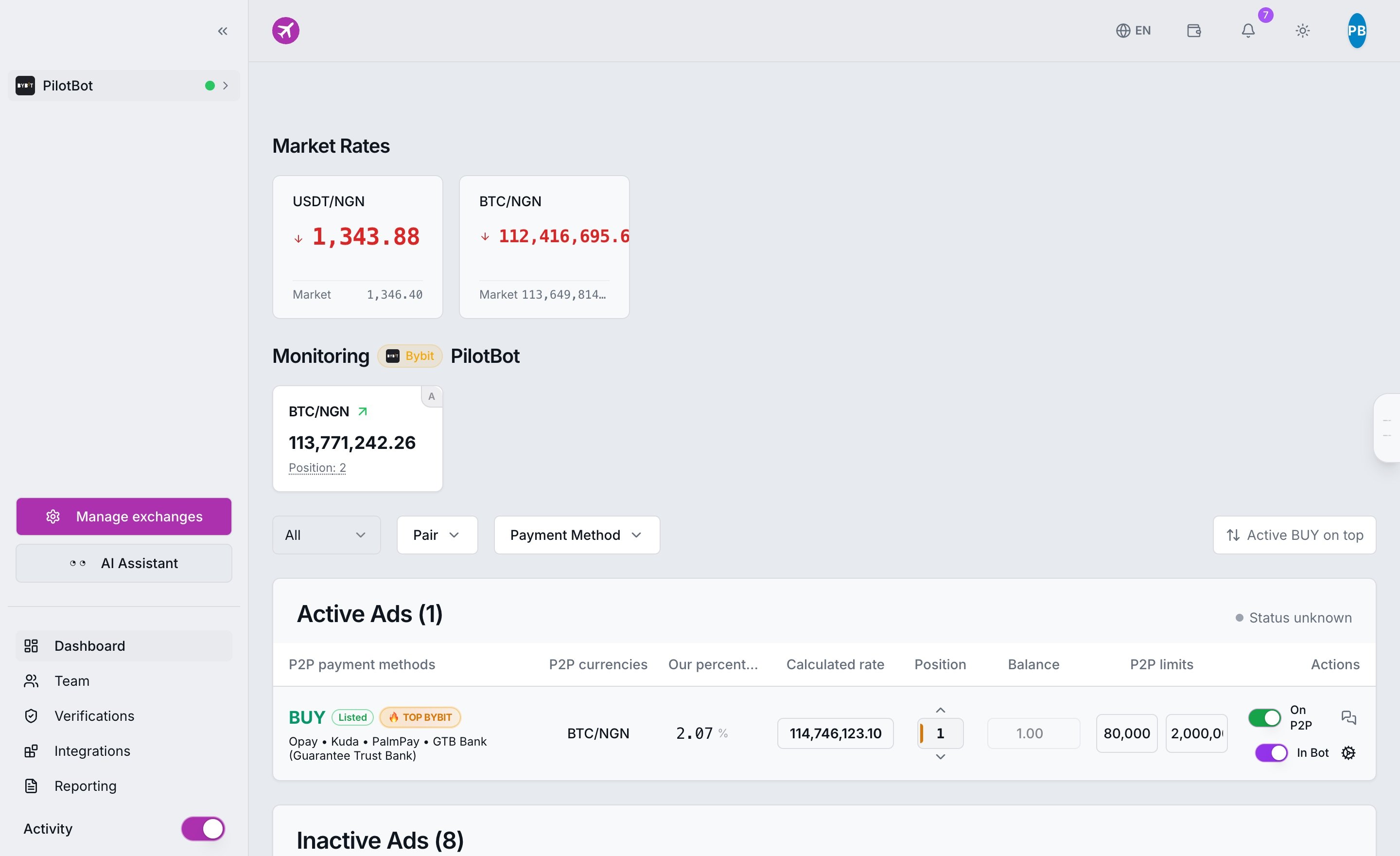
Pilotbot operates on the principle of complete trader control. The bot never begins repricing ads on its own — enabling automation always requires an explicit user action.
- Open the main Pilotbot dashboard.
- Locate the required ad in your active trading list.
- Check the switch state in the automation column: it should be enabled (green indicator / AUTO status).
- If the toggle is off, simply turn it on. The bot will pick up the ad during the very next worker cycle.
Step 2. Check the Ad Status on the Exchange Itself
Even if the toggle in Pilotbot shows green, the ad might be inactive on the crypto exchange itself (Binance, Bybit, OKX, or HTX).
When an ad shifts to Offline status or disappears from the public order book (for instance, after exhausting trade inventory, reaching a scheduled timer, or being paused manually in the exchange app), Pilotbot's safety protocols take effect:
- The system identifies that the order is no longer in the public order book.
- The worker automatically halts the repricing loop for this ad to prevent flooding the exchange API with invalid calls ("ghost orders").
- The dashboard flags the ad with an appropriate status label.
What to do:
- Log in to your merchant portal on the exchange and confirm the ad is Online / Active.
- Verify you have sufficient funds in your Funding Wallet to cover the ad's minimum order limit.
- Return to the Pilotbot dashboard and re-enable the automation toggle.
Step 3. Connection Pulse: Worker Health and API Keys
To dispatch price updates into the order book, Pilotbot requires an uninterrupted connection to your exchange account.
Open the Worker Monitor or inspect your account status in the dashboard sidebar:
- Online — Communication channel is active, ping is normal, and the trading worker dispatches commands without delay.
- Offline — Gateway lost connectivity with the exchange. Until connection is restored, repricing is halted.
Common reasons an account goes offline:
- API Key Expiration: Exchanges (notably Binance) automatically deactivate trade-enabled keys every 90 days unless bound to static trusted IP addresses.
- Revoked Permissions: Permissions on the key were modified on the exchange (the key requires read and spot/margin trading permissions).
- Exchange Rate Limiting: If request frequency limits are temporarily exceeded, the exchange may throttle or block API access for several minutes.
Step 4. Safety Corridor: Why a Static Price Is Capital Protection, Not a Bug
If monitoring cards are active and the worker is online, but the price hasn't adjusted for 10–15 minutes, 9 times out of 10 the Safety Corridor has engaged.
Traders often mistake algorithmic risk management for a system freeze. Pilotbot constantly computes the optimal quote, but strictly cross-checks it against your risk invariants:
- Minimum Sell Price (Min Price) — You will never sell below this value, regardless of market pressure.
- Maximum Buy Price (Max Price) — You will never purchase above this threshold.
- Minimum Spread — Protection against predatory price dumping and negative-margin trades.
If competitors slash their prices below your profitability floor, Pilotbot will not follow them down. The algorithm halts price decay exactly at your safe boundary and holds that level, patiently waiting for market normalization.
Step 5. Plan Limits and Available Slots
Each Pilotbot subscription tier includes a specific quota of concurrent active automation slots.
- If your plan allows 5 active ads and you enable toggles on 7 pairs, the system prioritizes the first 5, leaving the remainder queued without active repricing.
- If your billing period or free trial has expired, the worker automatically pauses repricing across all ads until renewal.
How to check:
- Navigate to billing through your profile menu or review the Plans and Limits page.
- Verify your subscription status and current slot utilization.
- If necessary, turn off unneeded ads or upgrade your plan to unlock more slots.
Emergency Protocol: If Nothing Else Helped
You verified all 5 steps:
- Dashboard toggle is on;
- Ad on the exchange is Online;
- Account in the monitor shows green;
- Safety corridor has not locked the price;
- Plan limits are not exceeded.
Yet your price still does not update? Follow the emergency protocol:
- Soft Restart: Turn off the ad's automation toggle in Pilotbot, wait 15 seconds, and switch it back on. This forces the worker queue to recreate the task.
- System Status Check: Review the service status page or in-app system notifications in your dashboard header — the exchange may be undergoing P2P API maintenance.
- Contact Support: If the issue persists, reach out to our team. To ensure our engineers resolve it immediately, please provide:
- Your Pilotbot username or User ID;
- Exchange and trading pair (e.g., Bybit USDT/KZT);
- Exchange Ad ID;
- A screenshot of the ad card from the Worker Monitor.