The Rates Section — The Main Number and 'Market'
What the rate cards at the top of the Pilotbot dashboard mean: the main reference rate used as the pricing anchor, and the 'Market' figure next to it.
Pilotbot Team
Author
On this page

At the very top of the Pilotbot trading terminal sits a compact yet critical section — the currency rate cards. These are far more than informational tickers: they are the navigational compass of the pricing core, governing every movement of your ads on the exchange.
Each card corresponds to a specific trading pair (such as USDT/RUB, USDT/THB, or BTC/USDT) and continuously streams two essential benchmarks: the reference anchor rate and the current market snapshot. Understanding how these two figures interact gives the trader complete control over their strategy and reliably shields their balance against market anomalies.
Quote Pulse on the Main Dashboard
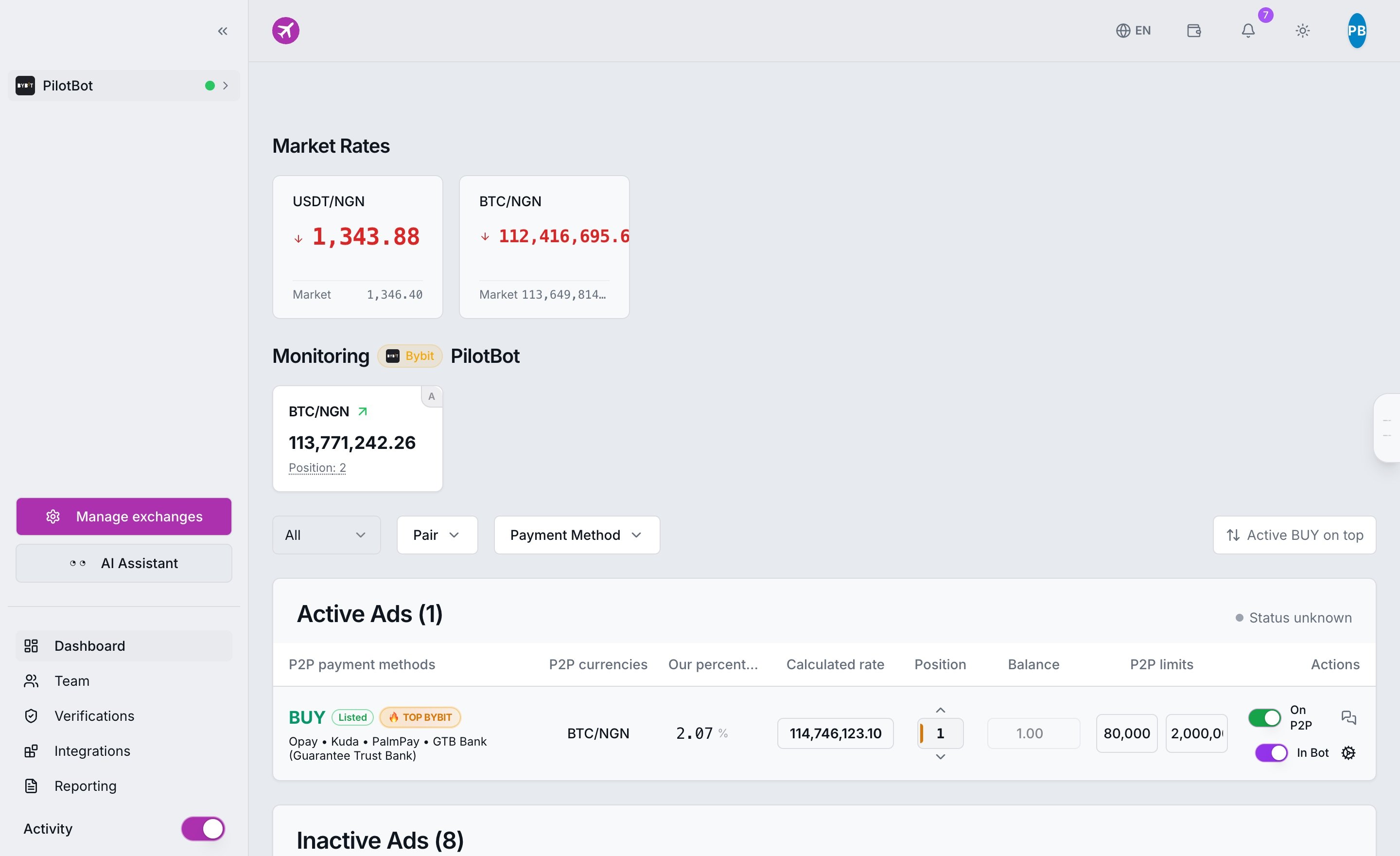
When you open the Pilotbot dashboard, the rates panel instantly provides a panoramic view of current conditions. In the fast-moving P2P environment, manual rate calculations inevitably lead to errors and missed profits. The rate cards provide real-time visual confirmation that the pricing layer is operating on fresh, valid exchange data.
Rate Card Anatomy: Two Numbers of One Trade
Every pair card in the terminal consists of three interconnected elements:
- Trading Pair — The base crypto asset and the fiat quote currency (e.g., USDT/RUB, USDT/THB, USDC/KZT).
- Main Large Number — Reference Rate. This is the mathematical anchor of the entire pricing model. Every price the algorithm submits to the order book is calculated relative to this value and subsequently adjusted for your target position, step increment, and safety thresholds.
- "Market" Badge with Number — Raw Market Rate. This is an instant snapshot of the market price on spot or P2P aggregators, displayed for transparent comparison.
Interpreting the Numbers
- Main number matches Market: Perfect market equilibrium. The pricing anchor is identical to the live market rate, reflecting balanced supply and demand.
- Main number differs from Market: The market is experiencing local spikes, heightened volatility, or decorrelation. During such moments, Pilotbot relies on its proprietary weighted reference to filter out order-book manipulation and market noise. This helps you understand exactly why a price was established at that specific level.
Why the Reference Rate Is Your Capital's Primary Shield
Ad prices are never generated in a vacuum. The crypto market frequently encounters flash crashes or illiquid spikes, where a single anomalous non-market order temporarily distorts the average exchange price. If the algorithm blindly followed every raw quote, your active ads could quickly execute at a loss.
The reference rate acts as a stabilizer. Crucially, it serves as the baseline for the Safety Corridor:
- The built-in hard limit of ±19.9% is calculated strictly relative to the reference rate.
- The main number on the card is the absolute mathematical center of this protected band, within which the worker has permission to adjust prices.
- Even if bad actors attempt predatory dumping in the order book, the algorithm halts at the corridor boundary and locks the price, preventing unprofitable executions.
Base Pairs: Cross-Rate Transparency
Accounts utilizing multi-asset strategies display an additional section in the interface: Base Pairs.
This group includes fundamental international currency benchmarks:
- USDT/USD and USDC/USD — stablecoin parities;
- USDT/EUR and traditional central bank foreign exchange feeds (FX feeds).
Why Do Traders Need Base Pairs?
You do not need to manually configure base pairs — they are calculated and maintained completely autonomously by the platform. Their presence on screen ensures 100% pricing transparency. When the bot computes synthetic chains (for example, cross-fiat arbitrage routes), you can always inspect the underlying base rates used to determine the math behind each trade.
Practical Checklist for Traders
To get the most out of the rates panel in your daily operations:
- Monitor the Delta: A gap between the main number and the Market figure exceeding 1–2% signals heightened market turbulence — check your active spreads.
- Evaluate the Corridor: Remember that the reference rate is the center of the safe zone. The greater the headroom to the corridor boundaries, the more room your bot has to compete for top positions.
- Check During Pauses: If an ad pauses or stops adjusting, a glance at the rate card will immediately reveal the reason for the hold.