Why the Price Looks Frozen (Usually It's the Corridor)
If your ad's price isn't changing, it is usually the safety corridor doing its job — not a malfunction. How to verify that the pricing layer is active and running.
Pilotbot Team
Author
On this page
- Corridor Architecture: An Invisible Shield Around Your Capital
- Internal Visibility: What Healthy Operation Looks Like on the Dashboard
- 4 Underlying Reasons Why the Price Isn't Changing
- 1. You Are Already on the Podium
- 2. Automation Switch Is Off
- 3. Exchange Gateway: Temporary Connection Disruption
- 4. Micro-Volume Order Filter
- Rapid Diagnostics: Confirming the Engine Is Breathing
- Related Articles

Why the Price Looks Frozen (Usually It's the Corridor)
Every P2P trader has experienced this scenario at least once: the market is stormy, competitors are frantically shuffling quotes, but your price in the order book remains frozen in place. The immediate panic reaction: "Did the bot hang? Has the worker crashed? Why is nothing happening?".
Breathe easy. In 99% of cases, an unmoving quote on the exchange is not a breakdown, but the iron grip of the safety corridor, defending your deposit from capital drawdown.
Corridor Architecture: An Invisible Shield Around Your Capital
At the core of Pilotbot's risk management lies the two-tier safety corridor. Under no circumstances will the bot move a price beyond the configured range (by default, an ironclad ±19.9% limit relative to the market benchmark, bounded by your minimum profitability thresholds).
Imagine competitors initiating aggressive price dumping, dragging the market deep into the red zone. If claiming your target position (e.g., TOP-1) requires posting a rate below your profitability threshold, Pilotbot will not follow the herd to the bottom. It will drop down to the exact boundary of the safe threshold and anchor there. In trading terminology, this is called a Corridor Hold.
| Market Situation | Standard Script Behavior | Pilotbot Behavior |
|---|---|---|
| Competitor dumps into deep losses | Blindly follows down, destroying your spread | Holds against the corridor boundary and defends margin |
| Sudden market flash crash (manipulation) | Sells at the very bottom of the wick | Freezes price changes until market stabilizes |
| Market normalizes | Requires manual reset and restart | Instantly resumes automatic position tracking |
As soon as the market turbulence calms down and fair quotes return within corridor boundaries, the pricing layer picks up the movement immediately and restores your target row without a single click from you.
Internal Visibility: What Healthy Operation Looks Like on the Dashboard
Rather than guessing in the dark, simply look at the main Pilotbot control panel. Every process is completely transparent, and each ad's status is visible in real time.
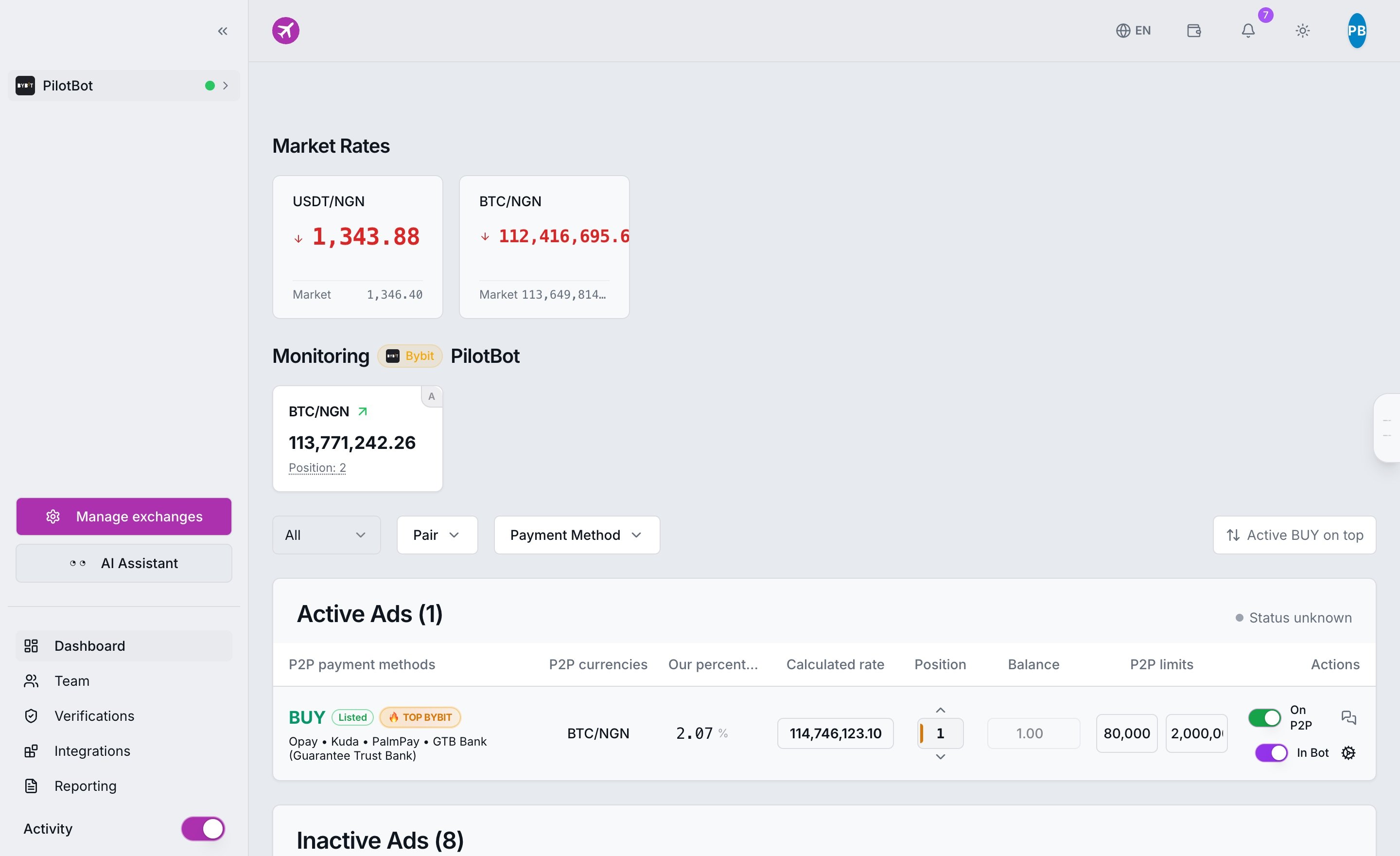
When the system is active, the dashboard displays live metrics for trading pairs, connected Binance and Bybit account balances, and the pricing engine status. If your ad shows an active status badge and the last snapshot timestamp updates every few seconds — the bot is running smoothly.
4 Underlying Reasons Why the Price Isn't Changing
Beyond the safety corridor, there are four other typical scenarios where a quote remains static. All of them represent normal system operation:
1. You Are Already on the Podium
You instructed the bot: "Hold 1st place with a 0.01 gap". The bot placed you at position #1. Competitors below you have paused and are making no moves. Why would the bot adjust the price every second? Pilotbot does not needlessly spam exchange APIs. If you already hold the best position and the market is quiet, the price will stay put until competitors move.
2. Automation Switch Is Off
Sometimes the simplest explanation is the correct one. Check the In Bot toggle in the ads table. If it is turned off, Pilotbot operates as a passive observer: it monitors the order book, but does not dispatch orders to the exchange. Read more in our guide on managing ads.
3. Exchange Gateway: Temporary Connection Disruption
If the exchange triggers a strict rate limit or your API key has expired, the pipeline stops pushing updates. The interface will display a connection status warning. Resolving this takes less than a minute — follow the reconnecting your account guide.
4. Micro-Volume Order Filter
If a competitor posts an attractive "super-price" but with an order limit of only $10, and you have set a filter to eliminate micro-orders, Pilotbot will legitimately disregard that pseudo-leader. To the bot, they simply do not exist in the filtered book of relevant competitors, so the price will not fluctuate for a fake benchmark.
Rapid Diagnostics: Confirming the Engine Is Breathing
If doubts remain, run a 3-step health check:
- Check the Worker Monitor: Navigate to the Worker Monitor. Here beats the platform pulse: processing cycle duration, exchange ping latency, and the active ads counter.
- Verify Timestamps: Look at the last update column. If the timestamp is fresh (within 5–15 seconds), the algorithm is actively recalculating the book.
- Inspect Spread Boundaries: Compare the current price against your minimum allowable margin. If the price sits flush against your configured limit — you are witnessing a textbook corridor hold.
Remember: what sets an intelligent trading bot apart from a basic auto-clicker is not how often it twitches the price, but how prudently it knows when to stop to preserve your money.